Same Thread, Different Moment: What Dispatchers.Main.immediate Really Changes
Both run on Android’s main thread, but one queues your coroutine and the other starts it now. Here is what breaks when you forget.
A short detour into coroutine dispatch on Android, and the production bugs that hide inside it.

Same Thread, Different Moment: What Dispatchers.Main.immediate Really Changes
Ask ten Android developers what separates Dispatchers.Main from Dispatchers.Main.immediate, and most will say "nothing, they both run on the main thread." That answer is correct about where and silent about when. The when is where the bugs live.
This post walks through the mechanism, shows what the AndroidX scopes do for you by default, and then goes through the failure modes I would actually expect to see in a code review or a crash report.
The short version
- Both dispatchers target the main thread. Neither one creates a thread or gives you parallelism.
Dispatchers.Mainalways posts a message to the mainLooper, even when you are already on the main thread. Your coroutine body runs on a later looper turn.Dispatchers.Main.immediateskips the post if you are already on the main thread, and runs the body inline, on the caller's stack, until the first suspension point.viewModelScopeandlifecycleScopeboth default toMain.immediate.
A two-line experiment
Drop this into a scratch Activity:
class CartActivity : AppCompatActivity() {

    override fun onCreate(savedInstanceState: Bundle?) {
        super.onCreate(savedInstanceState)

        Log.d(TAG, "1: before launch")
        lifecycleScope.launch(Dispatchers.Main) {
            Log.d(TAG, "2: inside coroutine")
        }
        Log.d(TAG, "3: after launch")
    }

    private companion object {
        const val TAG = "DispatchDemo"
    }
}
Logcat shows the lines in the order 1, 3, 2. The coroutine was handed to the main looper as a message, and onCreate had to finish before the looper could pick that message up.
Now swap the dispatcher for Dispatchers.Main.immediate:
lifecycleScope.launch(Dispatchers.Main.immediate) {
    Log.d(TAG, "2: inside coroutine")
}
The order becomes 1, 2, 3. No message was posted. The coroutine body ran in the middle of onCreate, on the same call stack, and control returned to the next line only after the body finished (or hit a suspension point).
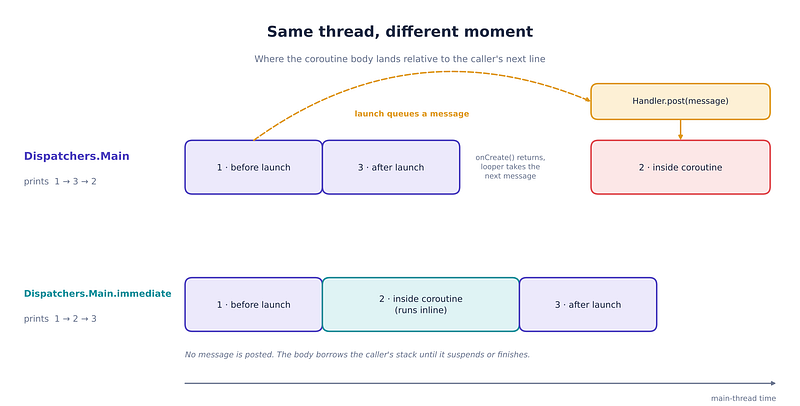
One detail worth pausing on: because lifecycleScope already uses Main.immediate, a plain lifecycleScope.launch { ... } gives you the 1, 2, 3 order. In the first snippet, passing Dispatchers.Main explicitly is what opted out of the immediate behavior.
What “dispatch” means here
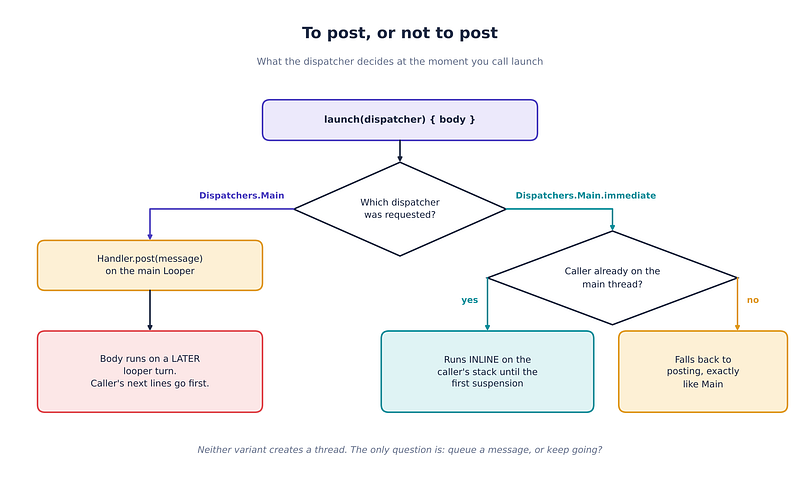
A dispatcher is asked one question every time a coroutine starts or resumes: is a dispatch needed? If yes, the continuation is handed to the dispatcher, which on Android posts it to the main looper’s queue. If no, the continuation keeps running right where it is.
Conceptually, the Android main dispatcher answers like this (a sketch of the idea, not library source):
override fun isDispatchNeeded(context: CoroutineContext): Boolean =
    !runsImmediatelyWhenPossible || Looper.myLooper() != mainLooper
For plain Main, the first operand is always true, so the answer is always "yes, post it." For Main.immediate, the answer is "post it only if the current thread is not the main looper's thread."
Two consequences follow:
- Called from a background thread, the two dispatchers behave identically.
Main.immediatehas nothing to skip. - “Immediate” is not “synchronous to completion.” The body runs inline only until its first real suspension. After that, resumption goes through normal dispatching rules again.
What the AndroidX scopes give you
viewModelScope is built on a SupervisorJob plus Dispatchers.Main.immediate, and lifecycleScope follows the same recipe. In practice:
class ProfileViewModel(private val repo: ProfileRepository) : ViewModel() {

    private val _title = MutableStateFlow("")
    val title: StateFlow<String> = _title.asStateFlow()

    fun onScreenShown() {
        viewModelScope.launch {
            _title.value = "Loading…"          // runs right now, inside onScreenShown()
            _title.value = repo.loadTitle()    // may suspend; resumes later
        }
    }
}
The first assignment happens synchronously during the call to onScreenShown(). That is a feature: the UI state can change without waiting for the next looper turn. It is also the source of everything below.
Failure mode 1: the stuck spinner
This is the one I would bet on seeing first in real code:
class FeedViewModel(private val repo: FeedRepository) : ViewModel() {

    private val _state = MutableStateFlow<FeedState>(FeedState.Idle)
    val state: StateFlow<FeedState> = _state.asStateFlow()

    fun refresh() {
        viewModelScope.launch {
            _state.value = FeedState.Content(repo.latest())
        }
        _state.value = FeedState.Loading
    }
}
When repo.latest() genuinely suspends (network, disk), the order is: body starts, suspends, Loading is set, later Content arrives. Looks fine.
When repo.latest() is a suspend function that happens to return a cached value without ever suspending, the body runs to completion inline. Content is set first, and then the line after launch sets Loading on top of it. Nothing is left to overwrite it. The screen spins forever, but only on cache hits, which makes it a nasty intermittent bug.
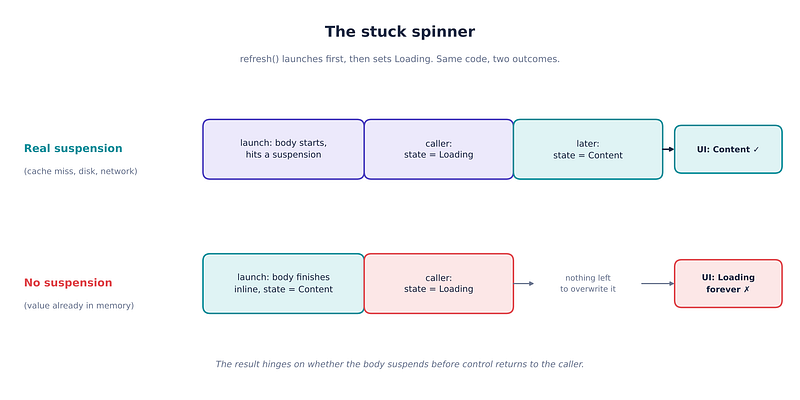
With plain Dispatchers.Main this bug could not exist, because the body would always run after the caller's remaining lines. The fix is to stop depending on ordering between "after launch" code and the body:
fun refresh() {
    _state.value = FeedState.Loading
    viewModelScope.launch {
        _state.value = FeedState.Content(repo.latest())
    }
}
Rule of thumb: set the “before” state before the launch, never after it.
This bug is easy to pin down with a test. I show how in Failure mode 4.
Failure mode 2: re-entrancy during bind or layout
Inline execution means your coroutine can run in the middle of someone else’s critical section. The classic Android victim is RecyclerView. Here is an anti-pattern. It is shown so you can recognize it in a review, not to copy:
// ANTI-PATTERN: do not ship this
override fun onBindViewHolder(holder: VH, position: Int) {
    val item = items[position]
    holder.bind(item)

    scope.launch {                                   // scope uses Main.immediate
        val badge = badgeCache.get(item.id)          // suspend, but instant on a cache hit
        items[position] = item.copy(badge = badge)   // stale position after any suspension
        notifyItemChanged(position)                  // can throw during layout or scrolling
    }
}
This snippet contains three separate bugs, and Main.immediate only causes the first:
- Re-entrancy. On a cache hit the body never suspends, so
notifyItemChangedfires from insideonBindViewHolder, which is inside a layout pass.RecyclerViewrejects that with anIllegalStateExceptionsaying you cannot call the method while it is computing a layout or scrolling. On a cache miss the same code works, so the crash appears only for some rows. - Stale position. On a cache miss the coroutine suspends, and by the time it resumes the list may have changed or the holder may have been rebound to a different row. The captured
positioncan now point at the wrong item, so the write lands on the wrong row (or throws an index error). - Unmanaged lifetime. The coroutine is not tied to the holder. A recycled holder keeps a running job that outlives its row, holds references to the adapter and views, and can paint an old badge onto a row that now shows something else. A scope that outlives the screen makes this a leak as well.
Preferred fix: do not mutate the adapter from bind at all. Resolve badges in the ViewModel, expose the finished list as state, and let ListAdapter.submitList diff it. There is no coroutine in onBindViewHolder, so there is nothing to race.
If you must load per row, tie the job to the holder, touch only that holder’s own views, and cancel on recycle:
class ItemViewHolder(private val binding: ItemBinding) : RecyclerView.ViewHolder(binding.root) {

    private var badgeJob: Job? = null

    fun bind(item: Item, scope: CoroutineScope, loadBadge: suspend (Long) -> Badge?) {
        badgeJob?.cancel()                           // drop any job from the previous row
        binding.title.text = item.title
        binding.badge.isVisible = false

        badgeJob = scope.launch {
            val badge = loadBadge(item.id)           // may or may not suspend
            binding.badge.render(badge)              // only this holder's views; no position, no notify
        }
    }

    fun unbind() {
        badgeJob?.cancel()
        badgeJob = null
    }
}

// In the adapter:
override fun onViewRecycled(holder: ItemViewHolder) {
    holder.unbind()
    super.onViewRecycled(holder)
}
Pass in viewLifecycleOwner.lifecycleScope from a Fragment so every pending job is also cancelled when the view is destroyed. This version is safe whether loadBadge suspends or not, because it never calls an adapter notification and never relies on a captured position. If you only need a one-off deferral, Dispatchers.Main (the non-immediate one) postpones the body until the current pass is over, which is one of the few legitimate reasons to pick it.
Failure mode 3: nested launches queue behind the outer body
Immediate dispatch is not a free-for-all. While an immediate coroutine body is running, further immediate starts on that thread are queued rather than nested on the stack, which keeps stack depth bounded. This is the same event-loop mechanism the docs describe for Dispatchers.Unconfined.
viewModelScope.launch {
    Log.d(TAG, "outer start")
    launch { Log.d(TAG, "inner") }
    Log.d(TAG, "outer end")
}
Expect the order outer start, outer end, inner. The inner launch was accepted but not started; it runs once the outer body suspends or finishes.
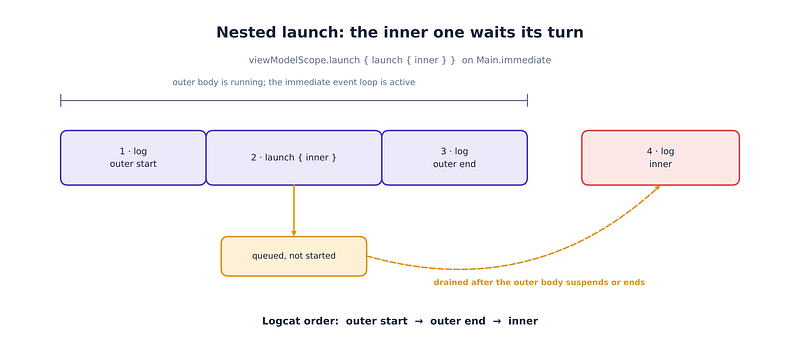
I would reproduce this once in a scratch screen so it stops being a surprise. The practical lesson is that ordering between sibling or nested coroutines is an implementation detail. If order matters, encode it: join(), async/await, a Channel, or simply sequential code in one coroutine.
Failure mode 4: tests that don’t match production
Unit tests replace the main dispatcher with Dispatchers.setMain(...), and the thing you install decides what "immediate" means in that test:
@Before
fun setUp() {
    Dispatchers.setMain(StandardTestDispatcher())
}
With a StandardTestDispatcher, coroutines launched in viewModelScope wait until you advance the scheduler, so a test can observe states in an order production never produces. With an UnconfinedTestDispatcher they start eagerly, which is closer to production but is still a different animal from a real looper. There is no real "already on the main thread" in a JVM test.
Three habits help:
- Assert on final states after
advanceUntilIdle(). - Avoid logic whose correctness depends on whether the first lines of a coroutine ran before or after the caller’s next line (see failure mode 1).
- Run each state-ordering test against both an immediate fake and a suspended fake, under both queued and eager starts.
Pinning the stuck spinner with a test matrix
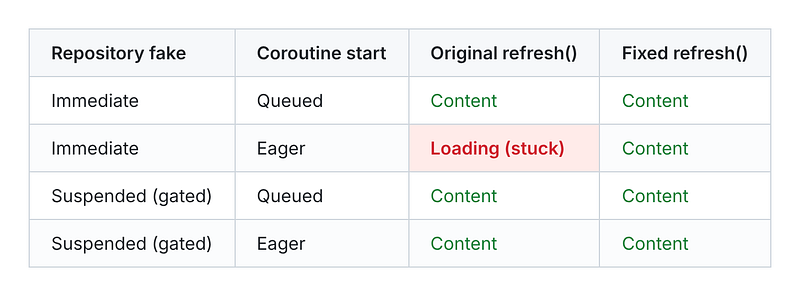
A network-like fake always suspends, so it hides the cache-hit path. To expose it, you need two repository fakes: one that returns immediately, and one that waits behind a gate your test controls. Pair each with both kinds of start: queued (StandardTestDispatcher) and eager (UnconfinedTestDispatcher). That gives four cases, and in every one refresh() should end in Content once the result has arrived, never Loading.
class FakeFeedRepository(private val gate: CompletableDeferred<Unit>?) : FeedRepository {
    override suspend fun latest(): List<Item> {
        gate?.await()               // null = returns immediately (cache-hit path)
        return listOf(Item(1))
    }
}

@OptIn(ExperimentalCoroutinesApi::class)
@RunWith(Parameterized::class)
class FeedViewModelTest(
    private val eagerStart: Boolean,
    private val gated: Boolean,
) {
    companion object {
        @JvmStatic @Parameterized.Parameters
        fun cases() = listOf(
            arrayOf(false, false), arrayOf(false, true),
            arrayOf(true, false), arrayOf(true, true),
        )
    }

    @Test
    fun refresh_endsInContent() {
        val dispatcher = if (eagerStart) UnconfinedTestDispatcher() else StandardTestDispatcher()
        Dispatchers.setMain(dispatcher)   // must run before the ViewModel is created
        try {
            val gate = if (gated) CompletableDeferred<Unit>() else null
            val vm = FeedViewModel(FakeFeedRepository(gate))

            vm.refresh()
            dispatcher.scheduler.runCurrent()   // let a queued coroutine start and hit the gate
            gate?.complete(Unit)
            dispatcher.scheduler.advanceUntilIdle()

            assertTrue(vm.state.value is FeedState.Content)
        } finally {
            Dispatchers.resetMain()
        }
    }
}
Install the test dispatcher before constructing the ViewModel, so Dispatchers.Main is already resolvable when viewModelScope is first used.
Here is what each case does against the original refresh() from Failure mode 1 and the fixed one:
stuck-spinner-test-matrix
Only one cell fails: the immediate fake with an eager start. That is exactly why the bug looks intermittent in production. It needs a cache hit, and the cache hit is the only time the body finishes before the line after launch. Against the fixed refresh(), all four cases end in Content.
Failure mode 5: heavy work before the first suspension
Inline execution also means the body borrows the caller’s time. If a click handler launches an immediate coroutine and the first thing it does is blocking work, the click handler pays for it:
saveButton.setOnClickListener {
    lifecycleScope.launch {
        val bytes = file.readBytes()            // blocks the main thread, inside the click
        preview.setImageBitmap(decode(bytes))
    }
}
Nothing about launch makes blocking calls safe. Move the blocking part behind a dispatcher that fits it:
lifecycleScope.launch {
    val bitmap = withContext(Dispatchers.Default) { decode(file.readBytes()) }
    preview.setImageBitmap(bitmap)
}
(Reading files is I/O, so Dispatchers.IO is the better fit for the read itself; the point here is only that blocking work must leave the main thread.)
Cheat sheet
Practical guidance
- Keep the defaults.
viewModelScopeandlifecycleScopealready useMain.immediate, and for most UI-state work that is what you want: no needless one-frame delay. - Never rely on “code after
launchruns first." With immediate dispatch it may not. Set pre-conditions before launching. - Choose
Dispatchers.Maindeliberately when you want deferral, for example to let a bind, layout, or transaction finish before touching the same state. - Never launch unmanaged coroutines from
onBindViewHolder. If a row needs async work, keep theJobon the holder and cancel it inonViewRecycled(), and never capture a raw adapter position across a suspension point. - Treat ordering between coroutines as unspecified unless you enforce it with structure (
join,await, channels, sequential code). - Never put blocking calls ahead of the first suspension of a coroutine started from a UI callback.
- Test outcomes, not interleavings, and cover both the immediate and the suspending path.
🔚 Closing thought
Main versus Main.immediate is a one-word difference with a surprisingly large blast radius. Neither makes your code faster in the parallel sense, and neither moves work off the main thread. What changes is a single decision: queue the work, or keep running. Once that decision is visible to you, a whole family of "it only fails sometimes" bugs turns into something you can reason about from the code alone.
🧵 Stop Treating Coroutines Like Magic Keywords
If “just add launch and hope” describes how your team handles concurrency, I’d recommend “Kotlin Coroutines Under the Hood” — a 25-chapter deep dive that goes past the syntax and down to the bytecode: the Continuation-Passing Style transform, the compiler-generated state machine, and exactly why a suspended coroutine costs a few dozen bytes while a blocked thread costs a megabyte.
It walks through structured concurrency and Job hierarchies, dispatcher internals (Default vs IO vs Unconfined), cooperative cancellation and exception aggregation, Flow’s cold-stream semantics and the full operator vocabulary, StateFlow/SharedFlow’s hot-broadcast model, Channels and fan-in/fan-out patterns, Mutex/Semaphore/actors for shared state, and a complete Android case study retrofitting a legacy callback-driven app onto coroutines and Flow — including a 100,000-coroutines-vs-100,000-threads benchmark lab you can run yourself.
- E-book: Available on Google Play
- Kindle Edition: Available on Amazon
- Topmate: Available on Topmate
- Also available in Paperback & Hardcover.
About the author
- Android Engineer & Kotlin Advocate. 🚀 Deep dives into Jetpack Compose, Coroutines, and Clean Architecture. Turning complex code into scalable solutions. 🛠️✨
Comments
Join the discussionNo comments yet. Be the first to comment.